> For the complete documentation index, see [llms.txt](https://guides.mangoapps.com/llms.txt). Markdown versions of documentation pages are available by appending `.md` to page URLs; this page is available as [Markdown](https://guides.mangoapps.com/integrations-guide/digital-signage/digital-signage-integrations.md).
# Digital Signage Integrations
### **Push Intranet Content to Your Existing Digital Signage System**
Elevate your organization’s communication efficiency across platforms to maximize impact in various settings, from frontline stores to corporate offices.
***
#### **Effortless Digital Content**
Incorporate Company-Wide Alerts, Posts, and Recognitions already published in your MangoApps intranet, efficiently migrating existing content that updates in real-time into your Digital Signage provider’s platform. MangoApps’ Digital Signage automatically displays posts published in your intranet, eliminating redundant content creation efforts and mixing domain content into the media you’re already displaying.
To ensure the most relevant information reaches your screens, admins can utilize Post Type Filtering. This allows you to choose exactly which categories of content appear—such as Announcements, Must-reads, or Regular Posts—ensuring high-priority news isn't diluted by routine updates.
***
#### **Engage Your Employees**
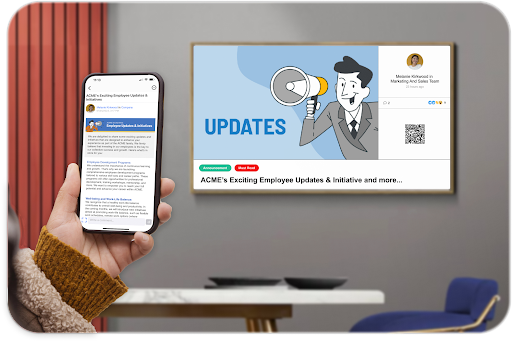
Display live updates and current intranet content that employees can view directly on their mobile devices by scanning a QR code shown on the display. For organizations seeking a cleaner, distraction-free aesthetic, the QR code can be toggled off within the Admin Portal, providing total flexibility over the visual interface.
Increase overall engagement by including Recognitions in your Digital Signage feed to highlight employees in public spaces. Whether celebrating a single milestone or a large team, the layout dynamically adjusts to showcase recipient profile images and names in a clear, professional grid.
***
#### **Integrate with External Providers**
Leverage our robust integration capabilities to connect your company’s intranet content to external Digital Signage displays. Easily add MangoApps content into your existing Digital Signage media feeds within your provider’s platform, all without any additional IT support. MangoApps’ Digital Signage seamlessly integrates with third-party digital signage providers, such as Rise Vision, Monitors AnyWhere, ScreenCloud, and more.
***
#### **Customize Your Visual Experience**
Enable both Digital Signage and content configuration all from your domain’s Admin Portal. Our system features Automatic Orientation Detection, meaning your content seamlessly adapts to both landscape and Portrait Mode (9:16). When a vertically-mounted screen is detected, the layout automatically reflows to stack content vertically—optimizing images, titles, and descriptions for readability without any manual setup.
Tailor your display with these configuration options:
* **Content Filtering**: Multi-select specific post types (Announcements, Must-reads, etc.) to curate your feed.
* **Visual Priority**: High-priority content automatically displays visual tags (e.g., "Must-read") that match your brand colors.
* **Typography & Branding**: Choose from multiple title sizes (48px to 84px) and customize background colors to match your organization’s unique brand.
* **Smart Image Handling**: Featured images and folder-based galleries are rendered to fill the screen beautifully; if an image doesn't match the aspect ratio, a blurred extension fills the gap to maintain a premium look.
***
### **Benefits of Integrating Digital Signage**
Integrating digital signage with MangoApps content enhances communication efficiency, ensures all employees stay informed with real-time updates, and fosters a culture of recognition and inclusivity. This approach boosts engagement, keeps content fresh, and reaches every corner of the organization, reinforcing a unified and motivated workforce.
**Streamlined Communication**\
This is fundamental as it ensures that critical information, such as urgent updates and consistent messaging, is efficiently disseminated to all employees, maintaining operational coherence and safety.
**Portrait & Landscape Versatility**\
Content automatically adapts to any screen orientation, ensuring a professional look on both horizontal and vertical displays.
**Targeted Messaging**\
Use post filters to ensure the right content—from urgent alerts to global announcements—reaches the right screens.
**Cultivation of Recognition Culture**\
Recognizing and valuing employees' contributions publicly is crucial for morale and motivation, fostering a positive work environment and encouraging excellence.
**Enhanced Visibility and Engagement**\
Keeping employees informed and engaged is essential for a cohesive company culture and ensures that everyone is aligned with company goals, news, and achievements.
**Flexible Engagement**\
Choose between interactive QR codes for deep-linking to content or a streamlined "view-only" mode for high-traffic areas.
**Dynamic and Fresh Content**\
The ability to automatically refresh content keeps the information relevant and engaging, ensuring employees remain informed without feeling overwhelmed by stale or repetitive messages.
**Broad Reach and Inclusivity**\
Extending content reach ensures that important information and recognitions are accessible to all employees, promoting inclusivity and ensuring that no one is left out due to their role or location within the company.