> For the complete documentation index, see [llms.txt](https://guides.mangoapps.com/llms.txt). Markdown versions of documentation pages are available by appending `.md` to page URLs; this page is available as [Markdown](https://guides.mangoapps.com/integrations-guide/single-sign-on/single-sign-on-integrations.md).
# Single Sign-On Integrations
SSO to almost any system
### Single Sign-on System Integrations
Securely authenticate users across company applications using Modern Identity Management (SSO), which eliminates the need for costly SSO providers and improves user experience by consolidating access. Enhance security by providing a safer environment for accessing third-party applications. Easily integrate pre-existing applications or add new ones used by the company. Streamline access for employees by providing quick links to important applications with automatic login capabilities.
***
### Benefits of Integratings your SSOs
#### Quickly Access Company Apps
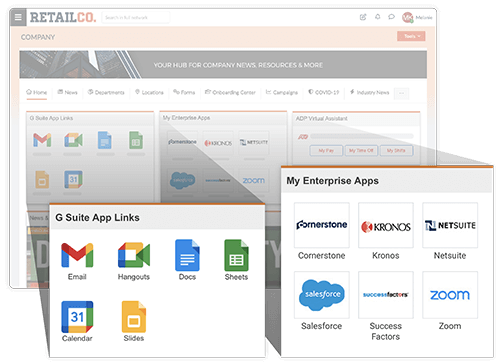
Users can access company resources through SSO links that are available on the user’s dashboard, primary navigation bar, or the SSO applications widget.
#### Add Configured Applications
Admins can add and push configured applications to user dashboards, providing them with updated application access without disrupting their personalized user dashboard.
#### SSO Dashboard Widget
Users can securely access company apps right from their dashboard. All applications configured to use MangoApps as the SSO provider are automatically listed in this widget.